

Audi CarPlay Upgrade: How to Choose the Right Retrofit
The simplest-looking Audi CarPlay upgrade may be the wrong one for your car. Fitment depends on the infotainment hardware already installed, so the model year alone may not identify which option will work.
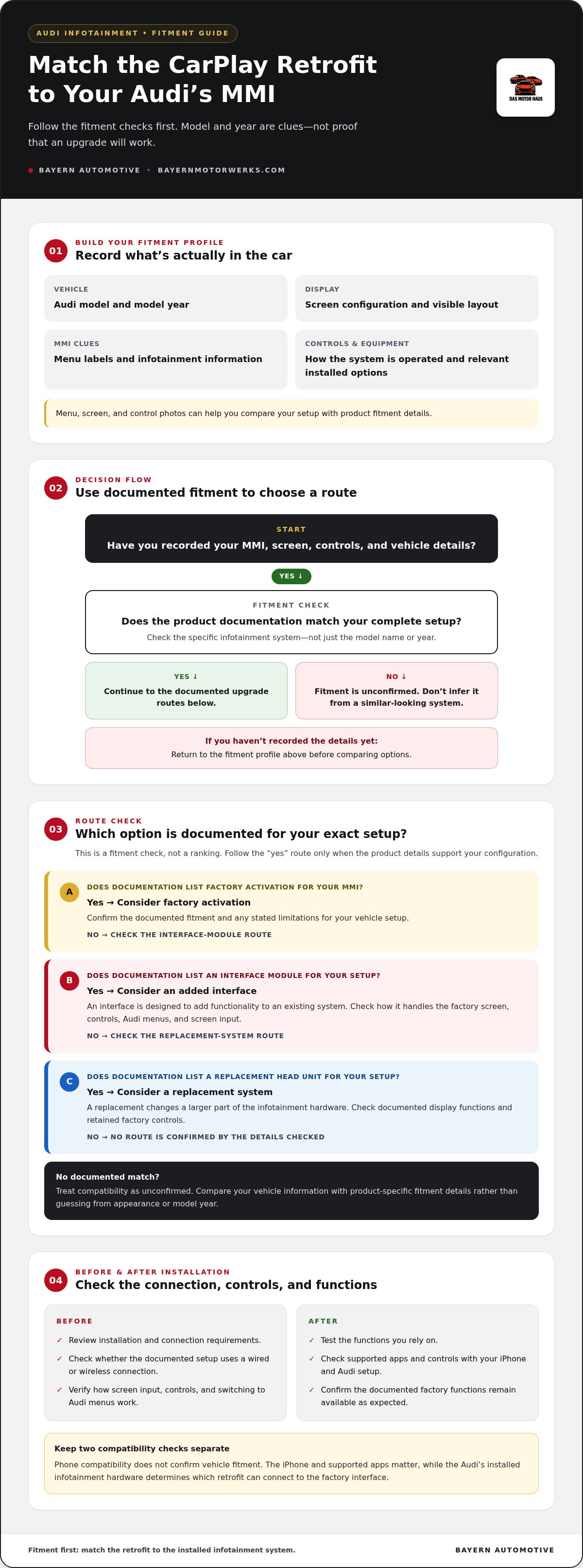
Before choosing between factory activation, an interface module, or a replacement system, identify your Audi’s MMI setup, screen, and controls. Each route connects differently and may affect factory functions in different ways. The right choice depends on your vehicle configuration and the retrofit’s documented fitment.
This guide walks you through the details to record, the common upgrade paths to compare, and the functions to check before and after installation. Bayern Automotive offers entertainment electronics alongside genuine OEM and premium aftermarket parts for Audi and other European vehicles. Start with your vehicle’s actual infotainment setup, then use product fitment information to narrow your options.
Key Takeaways
- Record your Audi’s model year, infotainment menu details, screen configuration, and controls before comparing retrofit options.
- Choose an Audi CarPlay upgrade for the specific MMI system, not the model name alone.
- Compare activation, an added interface, and a replacement head unit by their fitment, factory integration, display, and control requirements.
- Review the retrofit’s connection and installation requirements, then test the functions you rely on after installation.
- Use documented fitment details when exploring entertainment electronics to make a more informed purchase decision.
Audi CarPlay Upgrade: What It Adds to Your Factory Infotainment
An Audi CarPlay upgrade gives you access to supported iPhone features through compatible vehicle infotainment. Think of CarPlay as an interface that displays selected apps on the car’s screen and lets you interact through supported vehicle controls or voice commands, rather than as a standalone navigation system. Apple’s CarPlay overview describes it as a standard connecting an iOS device with a vehicle’s display and controls.
For everyday driving, compatible apps can support navigation, calls, messages, and music. Voice interaction can help you manage supported tasks without reaching for your phone. The available apps and controls depend on your iPhone, the Audi’s infotainment hardware, and the retrofit system. Check the functions documented for your setup instead of assuming every vehicle offers the same experience.
What changes when CarPlay is added to an Audi?
When CarPlay is active, the compatible system displays selected iPhone apps through the vehicle interface. A retrofit may use the factory screen and existing controls, but the way you switch between Audi menus and CarPlay depends on its design. Check how the system handles screen input, factory controls, and access to the original menus before choosing a retrofit.
An Audi CarPlay retrofit adds smartphone-app access through compatible factory infotainment. Its operation and retained functions depend on the vehicle’s hardware and the retrofit’s fitment.
What CarPlay does not replace
CarPlay provides access to supported smartphone apps. It does not automatically replace every part of the Audi’s original infotainment system. Depending on the vehicle and retrofit, the factory system may continue to manage vehicle settings and functions, while CarPlay provides its own interface for supported navigation, communication, and media apps. These are separate roles, even when they appear on the same screen.
This distinction matters when comparing an interface retrofit with a replacement head unit. An interface is designed to add functionality to an existing system. A replacement head unit changes a larger part of the infotainment hardware. Check the product documentation for the specific system’s retained display functions and controls instead of assuming either approach preserves everything.
For a considered Audi CarPlay upgrade, start with the infotainment already in your vehicle, not just the apps you want to use. The screen, menus, controls, and installed hardware all affect which upgrade approach can integrate with your Audi. Bayern Automotive offers entertainment electronics as part of its range of components and upgrades for European vehicles.
How to Identify Your Audi MMI System Before Choosing CarPlay
Start with the equipment in the car, not a broad model-year assumption. Audi infotainment configurations can differ within the same model range, and the display alone may not identify the system behind it. Before comparing an Audi CarPlay upgrade, collect enough details to match the retrofit’s fitment information to your specific vehicle.
Which Audi details matter for fitment?
Write down the model and model year, then note the screen and the controls used to operate it. Review the infotainment menus for system or software information, and check your vehicle documentation for details about factory equipment. Include installed options that may change the display, controls, or interface. If helpful, take clear photos of the screen, menus, and control layout so you can compare them with product fitment information.
- Vehicle: model and model year.
- Display: screen configuration and visible control layout.
- System clues: menu labels and infotainment information shown on screen.
- Equipment: installed options that may affect the factory interface.
These notes create a useful fitment profile, but they do not establish compatibility on their own. Two vehicles with a similar exterior or model designation may have different infotainment equipment. Use the model name and year as starting clues, then compare the complete configuration with the product’s vehicle-specific fitment details.
How to distinguish MMI generations and interfaces
Audi systems vary in their menus, controls, and hardware. A label in the system menu or vehicle documentation can help identify the infotainment platform, but compare that information with the physical screen and controls as well. Do not rely on a familiar generation name or visual resemblance alone. Those clues do not show that a retrofit supports your exact setup.
Keep vehicle-side and phone-side requirements separate. Apple’s Apple CarPlay information describes its features and supported devices, while the Audi’s installed equipment determines which retrofit options can connect to the factory interface. Check both, since phone compatibility does not confirm vehicle fitment.
Before purchase, compare your recorded details with the retrofit’s fitment documentation, including any stated limitations. If the documentation uses system labels, match them to information in your vehicle rather than inferring compatibility from model year alone. Bayern Automotive’s entertainment electronics selection offers vehicle technology for Audi and other European vehicles. Use product fitment details to guide your choice.
Compare Audi CarPlay Upgrade Options Without Guessing at Fitment
After identifying the infotainment hardware, compare upgrade routes by how they connect to it and how much of the factory setup they change. The right Audi CarPlay upgrade depends on verified fitment, the integration you want, and whether the selected system supports a wired or wireless connection in your vehicle. Do not assume connection type or retained factory functions based on a product’s appearance.
Factory activation or an added interface module?
Factory activation uses the vehicle’s existing hardware, so it is an option only when that hardware and configuration support the feature. An interface module adds CarPlay functionality while retaining parts of the original setup, though its operation and retained features depend on the specific system. Compare the product’s stated vehicle fitment, connection method, and supported functions before deciding. Apple describes CarPlay as a smarter, safer way to use your iPhone, but the Audi hardware determines how that experience is delivered.
| Option | Factory integration | Screen changes | Controls | Fitment dependence |
|---|---|---|---|---|
| Factory activation | Uses supported existing infotainment hardware | Generally works through the installed display | Depends on factory configuration | Requires compatible hardware and configuration |
| Interface module | Adds functionality alongside parts of the factory system | May use the existing screen | Operation varies by system | Must match the vehicle’s infotainment setup |
| Replacement head unit | Replaces a larger part of the original arrangement | May change the display setup | Factory-control integration varies | Depends on vehicle and replacement design |
When does a replacement system make sense?
A replacement head unit changes more than an interface module. It may suit a driver who wants a different screen or a more extensive infotainment change, but display layout, factory controls, and access to vehicle-specific functions depend on the replacement and Audi configuration. List the functions you want to keep, then compare them with the replacement’s documented support. Do not assume a replacement will preserve every original capability.
The right retrofit depends on your Audi’s MMI fitment and the level of factory integration you want. Treat wired or wireless operation as a feature to verify in the system documentation, not a default of any particular approach. Bayern Automotive’s entertainment electronics selection includes vehicle technology for European vehicles, making fitment an important part of the comparison.
Audi CarPlay Retrofit Checks: Installation, Controls, and Everyday Use
A careful verification sequence can prevent fitment assumptions from becoming installation problems. First, match the retrofit documentation to your Audi’s MMI and screen configuration. Then review the stated wiring, connection method, and interface requirements. Installation varies by retrofit design and the vehicle’s existing system, so follow the instructions for that setup rather than assuming every Audi is assembled or connected the same way.
For an Audi CarPlay upgrade, confirm whether the documented connection is wired or wireless and what the system requires to establish it. Note which original controls and functions the retrofit is designed to retain. These details give you a clear list of expectations to check after installation.
What to verify before installation
Use the vehicle details you recorded earlier to check the retrofit’s fitment documentation. Match the MMI and screen configuration, then review any wiring, connection, or interface requirements stated for the system. Look for how CarPlay is accessed and which factory controls or functions are supported. Installation steps differ, so instructions for a similar-looking Audi or another retrofit design are not a substitute for instructions that match your setup.
What to test after the upgrade
Test the system methodically before relying on it in everyday use. With the vehicle stationary, confirm that the CarPlay interface opens and connects through its documented method. Then check each relevant function:
- Connection: Does CarPlay connect as described?
- Display: Does the interface appear and respond as expected on the screen?
- Audio: Can you hear media and calls through the vehicle’s audio system?
- Microphone: Does voice input work during a call or supported voice interaction?
- Controls: Do steering-wheel and other factory controls operate where the documentation says they’re supported?
- Original functions: Can you access the Audi functions the retrofit is intended to retain?
Record any missing or inconsistent behavior and compare it with the retrofit documentation. A function that is not supported may reflect the system’s design. Unexpected behavior may indicate a connection or setup issue that needs attention. Testing each item separately makes it easier to tell the difference.
For Audi-focused entertainment electronics and other upgrades, explore Bayern Automotive’s entertainment electronics and Audi upgrades. Use documented fitment and functions to choose components for your vehicle.
Choose an Audi CarPlay Upgrade with a Fitment-First Buying Checklist
A confident purchase starts with a clear record of the equipment in your Audi. Match the retrofit’s fitment details to that configuration before weighing convenience features or choosing between wired and wireless connection. This keeps your decision grounded in compatibility rather than assumptions based on model name or appearance.
A practical pre-purchase checklist for Audi owners
Before comparing options, write down the vehicle details and the functions you want to preserve. Use this information to assess each Audi CarPlay upgrade against its product documentation:
- Identify the vehicle: Record the model and model year.
- Describe the infotainment: Note MMI details, screen configuration, menu information, and relevant installed equipment.
- Set your connection preference: Decide whether you want a wired or wireless connection, then check which method the documented system supports.
- Verify exact fitment: Compare your recorded details with the product’s stated vehicle and system compatibility. Do not infer a match from a similar model or screen.
- Review included functions: Check how CarPlay is accessed, which controls are supported, and which factory functions are retained or limited.
Let the product documentation guide your final comparison. Look for explicit fitment information and system-specific limitations, then weigh those against your priorities, such as keeping the original display arrangement or using a particular connection method. If a feature is not described, do not treat it as included.
Where to explore Audi entertainment upgrades
Infotainment components need to suit the vehicle they are intended for. Bayern Automotive offers entertainment electronics for Audi and other European vehicles, alongside genuine OEM and premium aftermarket parts. Use your recorded vehicle details as the basis for browsing, and compare documented functions before deciding which option fits your priorities.
For a broader look at relevant options, explore Bayern Automotive’s Audi electronics and upgrade categories.
Make Your Next Audi Infotainment Choice with Confidence
A sound Audi CarPlay upgrade decision begins with your vehicle’s actual infotainment hardware. Identify the MMI and screen configuration, then compare activation, an interface module, or a replacement system against exact fitment documentation. Connection type, factory controls, and retained functions depend on the vehicle and retrofit, so review those details before choosing.
After installation, test the connection, audio, microphone, display response, and supported factory controls. A methodical check helps you understand how the system performs in everyday use and whether its functions match your priorities.
Bayern Automotive supplies genuine OEM components and premium aftermarket parts for Audi, with products sourced from Europe and worldwide. Its entertainment electronics category includes options for automotive technology and upgrades.
Explore Bayern Automotive’s entertainment electronics and Audi upgrades to find components for your vehicle.
Frequently Asked Questions
Can every Audi be upgraded to Apple CarPlay?
No single retrofit applies to every Audi. Compatibility depends on the vehicle’s model year, MMI system, screen, installed equipment, and upgrade method. Start by identifying the infotainment system, then compare your details with the specific product’s fitment documentation. Two Audis with the same model name may have different equipment or support different functions, so do not use the model name alone to determine whether a retrofit will fit.
How do I find out which MMI system my Audi has?
Start with the vehicle’s model year, infotainment menus, screen layout, and available vehicle documentation. Record any system information shown in the menus, then compare it with the retrofit’s fitment information. Model name alone may not distinguish different equipment configurations. If a system label or generation is unclear, do not guess. Use documented identification details to establish which infotainment setup is installed before choosing a product.
Can I add CarPlay to my Audi without replacing the factory screen?
Some retrofit approaches are designed to use the existing factory screen, while others change more of the infotainment setup. The available option depends on the Audi’s MMI hardware and the specific retrofit. Review product documentation for screen compatibility, control methods, and retained factory functions. Do not assume a screen-preserving approach fits every Audi, even when vehicles share a model name or appear to have similar displays.
Is wireless CarPlay available for every Audi retrofit?
No. Wired or wireless operation depends on the vehicle configuration and the selected retrofit system. Check the product’s documented connection method and iPhone requirements instead of relying on the Audi’s model name. Consider how you prefer to connect during everyday use, but establish fitment first. Wireless convenience is only useful if the chosen system supports it in your vehicle’s specific infotainment configuration.
Will an Audi CarPlay upgrade keep my factory controls and features?
That depends on the retrofit design and the Audi’s existing equipment. Steering-wheel controls, audio, microphone, camera display, and vehicle menus may operate differently across systems. Review the product documentation for retained functions, then test the supported features after installation. An OEM-style appearance does not guarantee that every factory function will work exactly as it did before the upgrade, so assess operation as well as appearance.
Does adding CarPlay to an Audi require coding?
Requirements vary by infotainment system and retrofit approach. Some solutions may rely on the vehicle’s existing configuration, while others may involve additional setup or system-specific procedures. Follow the instructions for the exact retrofit and vehicle rather than applying a general rule to every Audi. Before choosing a product, review its documented setup requirements alongside fitment, connection type, and the factory functions it supports.
What should I check before buying an Audi CarPlay retrofit?
Record your Audi’s model year, MMI information, screen configuration, and relevant installed options. Compare those details with the product’s exact fitment documentation. Then review its wired or wireless connection method, control support, installation requirements, and retained factory functions. This fitment-first process helps distinguish vehicle-specific information from broad claims and gives you a clearer basis for selecting an upgrade that suits your Audi and priorities.